

Understanding the Gateway to Your Game
For many gamers, the thrill of online competition or cooperation is an essential part of the experience. However, network-related issues, such as those stemming from NAT and gaming configurations, can often dampen the fun. One key factor often overlooked is Network Address Translation (NAT). While it might sound complex, understanding NAT can significantly enhance your gaming experience.
NAT and Gaming: What is NAT?
Imagine your home as a small town with a single phone line. Multiple people in your household want to make calls simultaneously. To manage this, the phone company uses a system to translate your internal phone number to the external line. Network Address Translation (NAT) works similarly for your internet connection. Just as there are different ways to manage multiple callers on a single line, there are various Types of NAT that handle multiple devices sharing one internet connection. NAT acts as a translator between your home network and the wider internet, allowing several devices to communicate through a single public IP address.
Your router acts as the town’s operator, translating your computer’s internal IP address (a unique identifier) to a public IP address used for communication outside your network. This helps conserve IP addresses and provides a layer of security.
NAT and Gaming: NAT Types and Their Impact on Gaming
There are three primary NAT types:
- Open NAT: This is the ideal scenario for gaming. It allows unrestricted communication with other players, minimizing connection issues and lag.
- Moderate NAT: While better than Strict NAT, Moderate NAT can still cause problems. You might experience matchmaking difficulties or be unable to host online games.
- Strict NAT: This is the most restrictive type and often leads to connection problems, making online gaming frustrating.
The type of NAT you have depends on your router configuration and network setup.
NAT and Gaming: Why NAT Matters for Gamers
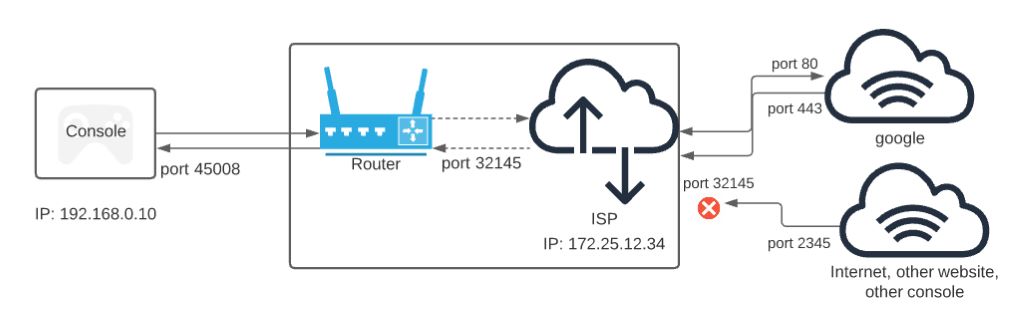
- Connection Quality: An Open NAT generally provides a smoother and more reliable connection, reducing lag and packet loss.
- Matchmaking: Some games prioritize players with Open NATs for matchmaking, increasing your chances of finding suitable matches.
- Hosting Games: If you enjoy hosting multiplayer games, an Open NAT is essential for a stable connection for all participants.
Improving Your NAT Type
While you might not be able to achieve an Open NAT in all cases, several steps can help optimize your connection:
- Port Forwarding: This involves manually opening specific ports on your router to allow direct communication with game servers. Many games provide recommended port ranges.
- UPnP (Universal Plug and Play): If enabled on your router, UPnP can automatically forward ports for compatible applications. However, it’s often recommended to use port forwarding for more control.
- DMZ (Demilitarized Zone): This exposes a device to the internet without NAT, but it’s generally not recommended due to security risks.
- Router Firmware Updates: Keeping your router’s firmware up-to-date can resolve issues and improve performance.
- Contact Your ISP: In some cases, your Internet Service Provider (ISP) might be causing NAT-related problems. Contacting them for support can be helpful.
Is Your Wi-Fi Killing Your Phone’s Battery? A Deep Dive and Troubleshooting Tips
Beyond NAT: Other Factors Affecting Gameplay
While NAT is crucial, other factors influence your gaming experience:
- Internet Speed: A fast, stable internet connection is essential for low latency and reduced lag.
- Wired Connection: Using a wired Ethernet connection often provides a more reliable connection than Wi-Fi.
- Network Congestion: Heavy internet traffic can impact your gaming performance.
- Game Server Location: Choosing servers closer to your geographical location can reduce ping and improve responsiveness.
- Quality of Service (QoS): Some routers offer QoS settings to prioritize gaming traffic.
Related: How to Remove Temu Malware and Preventing Reinfection
A Positive Mindset: Overcoming Challenges
Improving your NAT type and network conditions can significantly enhance your gaming experience. However, it’s essential to maintain a positive attitude. Not all issues can be resolved immediately, and occasional network hiccups are part of online gaming.
By understanding NAT, making necessary adjustments, and approaching challenges with patience, you can optimize your gaming setup and enjoy a more satisfying online experience.
Remember: Consistent and persistent effort is key. Don’t hesitate to experiment with different settings and troubleshoot issues systematically. With time and dedication, you can overcome network hurdles and elevate your gameplay.